
We Make IT Work.
RESOURCES: BLOG
Inside an RFID Label: TID, EPC and User Memory Explained
I was talking to a customer recently about an RFID system, and after a few acronyms I could tell I had lost them. Hopefully this post explains the contents of an RFID tag in plain English. Most people think an RFID label holds one number. In reality, the tiny chip inside a UHF RFID label is divided into four separate sections of memory, and each one has its own job. If you’ve ever heard terms like EPC, TID or User memory and wondered how they’re different, this post is for you. We’ll walk through each part, explain what it’s used for, and show why it matters when you’re planning an RFID project.
The four memory banks at a glance
The industry standard for UHF RFID (called EPC Gen2, or ISO 18000-63) splits every chip into four “memory banks.” Think of them like four drawers in a small filing cabinet.
|
Bank |
Name |
What it holds |
Can you change it? |
|---|---|---|---|
|
0 |
Reserved |
Passwords that protect and disable the tag |
Yes, and it can be locked |
|
1 |
EPC |
The item’s ID number, the one your software uses |
Yes, you encode it |
|
2 |
TID |
The chip’s factory “birth certificate” and serial number |
No, locked at the factory |
|
3 |
User |
Optional extra space for your own data |
Yes, if the chip has it |
When most people say they “read a tag,” they’re reading the EPC. The other three banks work quietly in the background.
EPC: the item’s license plate
The EPC (Electronic Product Code) is the number that identifies the item the label is stuck to. It’s the RFID version of a barcode, and it’s what your inventory or ERP system looks up.
- Who writes it: You do, or your label printer does. An RFID printer can encode the EPC and print the label in one pass.
- Size: Usually 96 bits, which is about 24 characters of hex. Some chips allow longer EPCs.
- Can it change? Yes. You can rewrite it, or lock it so it can’t be changed later.
- What goes in it: Often a standard GS1 format such as an SGTIN (a product’s GTIN plus a serial number). Many businesses simply encode their own asset number, SKU or bin number.
In short, the EPC answers the question: “What is this thing?”
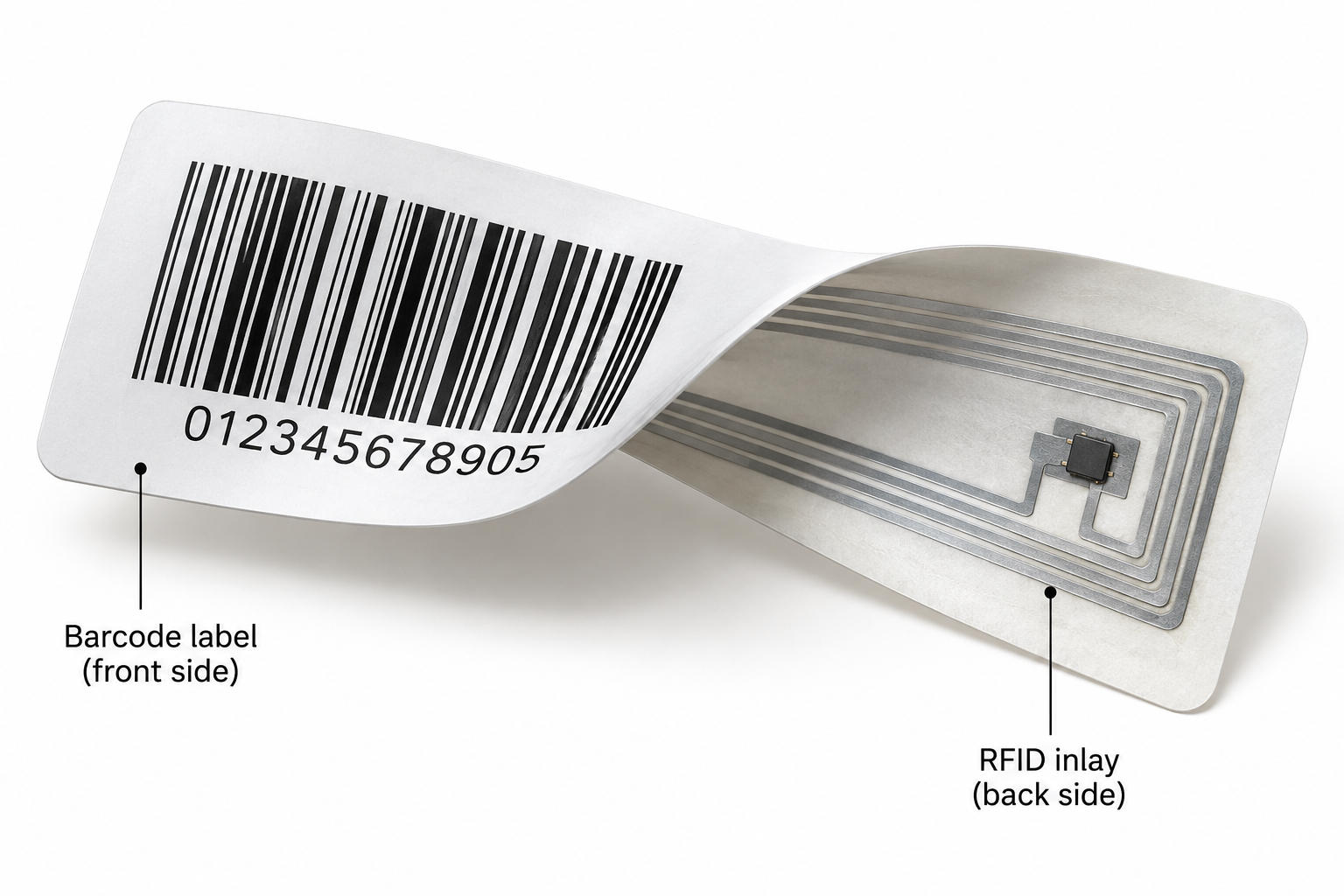
Is an RFID label also a barcode label? Absolutely.
An RFID label is not either/or. It’s a regular printed label with a tiny chip and antenna inside, so the face can carry a barcode, text and logos just like any other label.
In most projects, the RFID printer encodes the chip and prints the barcode in the same pass. Many times, the barcode contains the exact same data as the EPC. Scan the barcode or read the tag, and you get the same number pointing to the same record in your system.
Why print a barcode on an RFID label?
- Backup: If a tag is damaged or won’t read, a scanner can still read the barcode.
- Works with what you have: Existing barcode scanners and processes keep working.
- Easy transition: You can roll out RFID in one area while the rest of the operation still scans barcodes.
- Human-readable: People can see and verify the number at a glance.
Think of it as two ways to read the same label: scan it one at a time with a barcode scanner, or read hundreds at once with RFID.
TID: the chip’s birth certificate
The TID (Tag Identifier) is written by the chip manufacturer at the factory and permanently locked. Nobody can change it, not you, not us, not anyone downstream.
The TID tells you:
- Who made the chip (for example, Impinj or NXP)
- Which chip model it is
- A unique serial number on most modern chips, so no two chips share the same TID
Why does that matter? Because the EPC can be copied. Someone could write the same EPC onto two different labels. The TID can’t be copied the same way, so it’s useful for:
- Anti-counterfeiting: Pair the EPC with the TID in your database. If the EPC shows up with the wrong TID, something’s off.
- Duplicate checks: Two labels with the same EPC can still be told apart by their TIDs.
- Troubleshooting: Knowing the chip model helps when a tag reads poorly or behaves differently.
The TID answers the question: “Which exact chip is this?”
User memory and Reserved memory
User memory is optional extra space for data you want to carry on the tag itself. Some labels have none; others have a few hundred bits up to several thousand. It’s handy when the data needs to travel with the item, such as a lot number, an expiration date or a maintenance date on a tool. For most inventory projects, though, the EPC points to a record in your database and User memory goes unused.
Reserved memory holds two passwords, each 32 bits:
- Access password: Protects the tag. Once set, a reader needs this password to change locked data.
- Kill password: Permanently disables the tag. A “killed” tag will never respond to a reader again, which some retailers use for privacy at checkout.
If you never set these passwords, they stay at zero and the tag works normally.
Putting it all together
Here’s how the parts work together in everyday projects:
- Warehouse inventory: The EPC holds the SKU and serial number. A handheld reader counts thousands of items in minutes, and the software looks up each EPC.
- Asset tracking: The EPC holds your asset tag number. The TID is stored alongside it so a cloned label can be caught.
- Pharmacy or healthcare: The EPC identifies the bin or item, while User memory can carry details like a lot number that need to stay with the product.
- Retail checkout: The EPC identifies the product, and the kill password can switch the tag off once it’s sold.
The short version:
- EPC = what the item is (you set it), and often the same data as the barcode
- TID = which chip it is (the factory sets it)
- User = optional extra data
- Reserved = passwords
Choosing the right label, chip and encoding plan up front saves a lot of headaches later. If you’re planning an RFID project and want help picking labels or setting up encoding, the team at Barcom is happy to talk it through.

4136B Jersey Pike, Chattanooga, TN 37421
Phone (423) 855-1822 | Fax (423) 499-6317
sales@barcominc.com
CONTACT US
BARCOM, INC. • sales@barcominc.com • 423-855-1822